Step 1: Look at the finger icon on the screenshot, click the blue button to start make the payment by credit card.
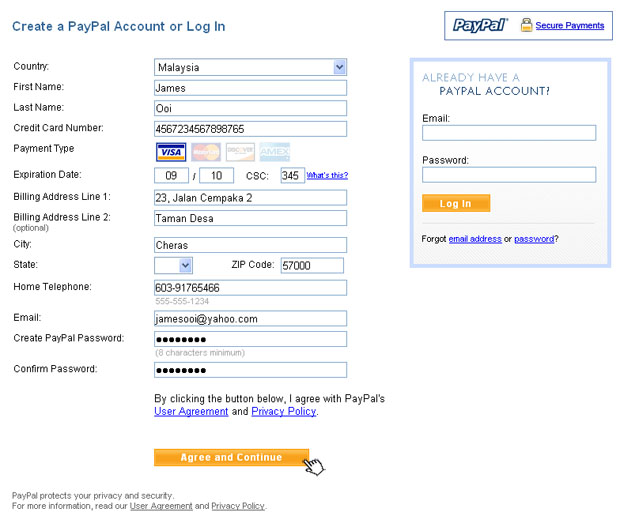
Step 2: A window will pop-out. For the credit card purchasers, click continue checkout to proceed the payment by credit card;
For the PayPal purchasers, just
login your
PayPal account by your PayPal email id and password inside the Login box at the
right hand side to procced the payment.

Step 3: Keyin your true particulars and credit card details to proceed the payment. At the Create Paypal Password Column, just
key in any alphabets and numbers that more than 8 characters will do. At the Confirm Password Column, jus rekeyin the same
characters that you keyin inside the Create Paypal Password Column just now.
Step 4: You request to keyin Paypal code to proceed the payment.

Step 5: Immediate call to your credit card service center to request the Paypal code. You should get the Paypal code between few minutes.

Step 6: Keyin the 4 digit Paypal code that you request from bank official inside the textbox then click "Submit" button to confirm your credit card and proceed the payment.

Step 7: Review your payment. After confirm your payment, click the orange button to make the payment.

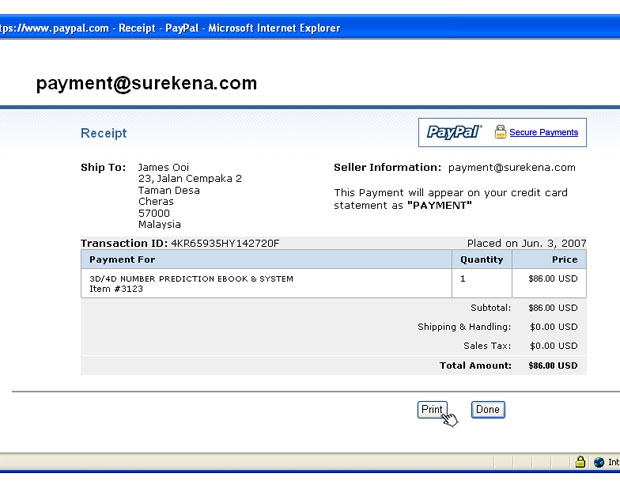
Step 8: The payment was successful done. You may print out the receipt by click View Printable Receipt.

Step 9: A window will pop-out. Click Print button to print-out the receipt for your reference. We will contact you as soon as possible once we tracked
your transcation.